One simple form
Your email address and password, with a Remember me option and a Forgot password? link under the fields.
Log in to Titan Luck on your computer or phone
Email and password, a Remember me option, two-factor authentication and live chat in English and French if you get locked out
Titan Luck login in short
One simple form
Your email address and password, with a Remember me option and a Forgot password? link under the fields.
Two-factor authentication
An authenticator app guards your account, and every connection to the site uses TLS encryption.
Phone unlock
Fingerprint or Face ID on your phone, with the biometric data staying on the device.
Keeping your account safe
What you should do
What you should avoid
Titan Luck has one way to log in: your email address and password. The form also has a Remember me tick box, a Forgot password? link, and an I don’t have an account button for new players. There is no social login, so the account you registered with is the one you use.
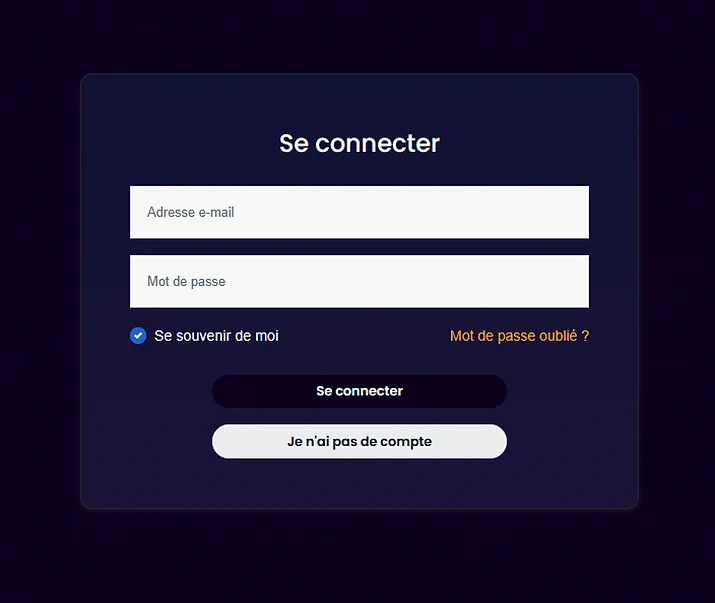
| Element | What it does |
|---|---|
| Email address | The address you registered with |
| Password | The password chosen at registration |
| Remember me | Keeps you signed in on that device |
| Forgot password? | Sends a reset link by email |
The same Titanluck form opens the same account on a computer, on a phone and in the app, and the account currency stays CAD. Email and password suits players who like to manage their own credentials, and the Remember me option saves retyping them on a device only you use.
If you share a device with someone else, leave Remember me unticked, because the session would stay open for the next person.
Three layers protect your login: TLS encryption of every connection, two-factor authentication and phone unlock. You manage these settings from your account, and they work together with the responsible gambling limits.
You turn it on with an authenticator app such as Google Authenticator, Authy or Microsoft Authenticator. The app produces a six-digit code that renews every 30 seconds, and you type it in at each login.
When you activate it, you receive ten backup codes. Keep them away from your phone, on paper for example, so you can get back in after changing devices. The code is also needed to switch the protection off, so nobody else can remove it.
On a phone, your fingerprint or Face ID can open your session instead of the password. The fingerprint or face data stays on the device, and Titan Luck never receives a copy: the site only gets a confirmation from your phone.
The password remains available as a backup, for instance if the sensor fails to recognize you.
Before a withdrawal, or during a check, we may ask for a driver’s licence, a Canadian passport, a provincial photo ID card or a permanent resident card, together with a proof of address dated within the last 3 months, such as a utility bill, a bank statement or a Canada Revenue Agency notice of assessment. For withdrawals we also ask for a void cheque or a bank statement in your own name.
Verification takes 24 to 48 hours, and it is requested at your first withdrawal or once your cumulative deposits reach $1,550.
The steps are the same on every device: enter your details, confirm who you are, and arrive at the cashier, the Free Spins Wheel and the VIP club. The login opens the same account with the same balance and history wherever you use it.
Open Titan Luck in your browser and click the Log in button in the top right corner. In the form, enter your email address and password, tick Remember me if the computer is yours, and confirm.
If two-factor authentication is on, the site then asks for the six-digit code from your authenticator app. Once it is accepted, you are taken back to the page you were on, with your CAD balance showing in the header.
On a phone, open the menu of the page and tap Log in. The same form is offered, and the fields fit your screen.
If your phone supports fingerprint or Face ID, that unlock replaces typing the password: touch the sensor or look at the screen, and the session opens. It is convenient for daily use, but it does not replace the two-factor code when that protection is on.
The app’s login screen offers the same form as the site. You sign in with the details you used at registration, and the session stays tied to your account.
The app is added from the website, and the options are explained in the app guide. Once it is open, your phone’s unlock works as it does in the mobile browser, and the session ends after 30 minutes of inactivity.
Most login problems come from a forgotten password, a temporary block or an authentication code that the site rejects. Each one has a short fix, listed below, and support steps in when the fix is not enough.
Click Forgot password? under the password field and a reset link, valid for 1 hour, goes to the email address on your account. If the message is slow to arrive, look in your junk folder and double-check that you typed the address you registered with.
Pick a new password that you do not use anywhere else, then log in again.
After 5 failed attempts, access is blocked for 30 minutes. Let the delay run out before you try again instead of repeating the attempts.
A session that sits idle is logged out after 30 minutes, which can make a page ask for your details again even though nothing is wrong with the account.
Start with the clock on your phone: the six-digit codes change every 30 seconds and rely on an accurate time, so a phone that runs behind produces codes that fail. Switch on automatic date and time and enter the next code.
If you no longer have the authenticator app, use one of the ten backup codes issued when you activated the protection.
If these steps do not solve it, our live chat is open every day from 8 a.m. to 8 p.m. ET, in English and in French. Its average response time is under 3 minutes.
You can also email Titanluck support at [email protected] and expect a reply within 12 hours. Give the email address of your account and, if possible, attach a screenshot of the error, which speeds up the answer.
Registration is a single form, filled in in about a minute, with CAD as the account currency, and it is open to players aged 19+ (18+ in Alberta, Manitoba and Quebec). The form asks for your first name, last name, email address, password, country, mobile phone number and date of birth, and it includes your consent to functional and marketing communications.
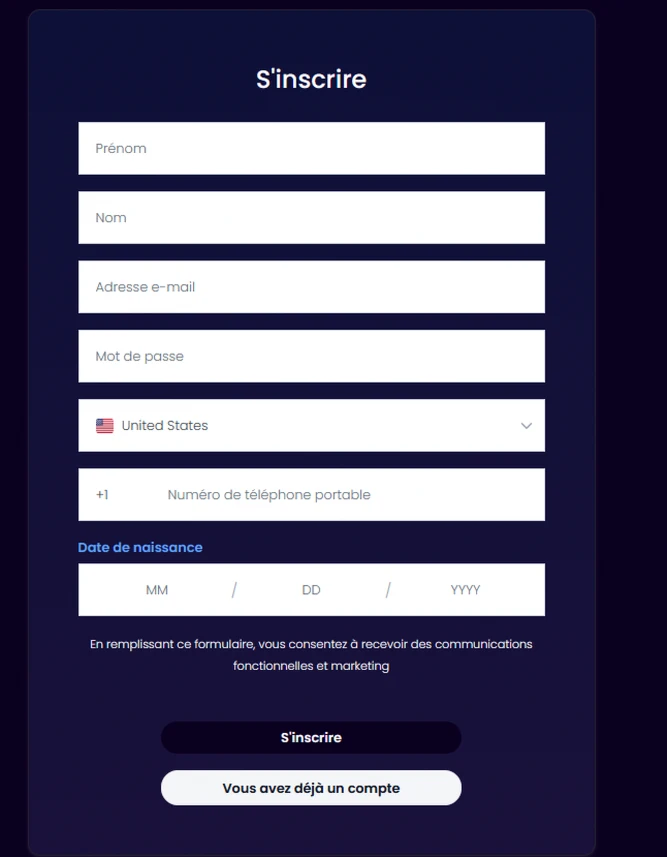
The account is confirmed by email, and you can then set deposit limits from the settings. The 200% welcome boost of up to $15,500 + 250 free spins is described on the Titan Luck bonus page, for players aged 19+ (18+ in Alberta, Manitoba and Quebec).
Questions about logging in
Click Forgot password? under the password field and we send a reset link, valid for 1 hour, to the email address on your account. If nothing arrives, write to [email protected] or open the live chat.
It keeps you signed in on that device until the session ends or you log out. An inactive session is still logged out after 30 minutes.
No, each player may hold only one account, and a bonus restriction on one account of a household applies to all of them. If you cannot access your account, live chat in English or French will help you recover it.
Open your Titan Luck account
Claim 200% up to $15,500 and 250 free spins.
Start Playing Gambling carries a risk of addiction. You must reach the legal age in your province, and the bonus terms apply.